Cyber threats today are faster, stealthier, and more evasive than ever. Traditional security tools like firewalls, antivirus, and SIEMs rely on known signatures and predefined rules—leaving organizations blind to fileless malware, zero-day exploits, and advanced persistent threats (APTs) that operate under the radar. This is where threat hunting techniques become essential: a proactive, intelligence-led discipline that assumes breach and actively searches for hidden adversaries before they strike.
Unlike reactive alert-driven models, threat hunting flips the script. Instead of waiting for an alarm, skilled analysts use behavioral analytics, threat intelligence, and deep forensic investigation to uncover malicious activity that automated systems miss. The goal? Slash dwell time—the average 200+ days attackers remain undetected—and stop breaches before data is stolen or systems are crippled by ransomware.
In this guide, you’ll explore the most effective threat hunting techniques used by elite security teams, how to apply them using frameworks like MITRE ATT&CK, and what tools and data sources power successful hunts. Whether you’re enhancing your SOC or building a formal hunting program, these strategies will help you detect threats others overlook.
Core Threat Hunting Methodologies

Effective threat hunting follows structured, repeatable methodologies—not guesswork. These foundational approaches turn suspicion into actionable investigations.
Hypothesis-Driven Hunting
Start with a testable theory about attacker behavior.
A hypothesis transforms vague concerns into focused, evidence-based searches.
- Example hypotheses:
- “Are attackers abusing WMI for lateral movement?”
- “Is PowerShell being used to bypass execution policies?”
- Sources for hypotheses:
- Threat intelligence reports
- Industry-specific attack trends
- Internal anomalies or near-misses
Using logs, EDR telemetry, and forensic data, hunters validate or disprove each hypothesis. Even negative results improve security posture by confirming detection coverage.
Pro Tip: Leverage MITRE ATT&CK to generate high-impact hypotheses. For instance, if T1047 (Windows Management Instrumentation) is frequently exploited, create a hunt focused on WMI abuse across endpoints.
Intelligence-Based Hunting
Use external threat intelligence to search for known malicious indicators inside your environment.
- Input sources:
- IOCs (IPs, domains, file hashes) from threat feeds
- Dark web monitoring
- Malware sandbox reports
- Vendor advisories (e.g., CISA alerts)
Process:
1. Ingest IOCs into SIEM or EDR platforms
2. Run retroactive queries across historical data
3. Investigate any matches for deeper context
Real-world example: After the SolarWinds SERV-U vulnerability advisory, hunters searched for Serv-U spawning PowerShell, leading to early detection of Cobalt Strike C2 activity.
Key Insight: While fast and targeted, this method only catches known threats—combine it with behavioral analysis for broader coverage.
Analytics-Driven Hunting
Detect anomalies using machine learning and behavioral baselines—no prior knowledge of IOCs required.
- Tools: UEBA, NTA, SIEM with statistical modeling
- Focus areas:
- Unusual login times or locations
- Sudden spikes in file access
- Deviations from normal user behavior
Technique: Establish a baseline (e.g., average number of database queries per user), then flag significant outliers.
Example: A finance team member accessing engineering servers at 3 AM triggers an investigation—later confirmed as a compromised account used for lateral movement.
Why It Works: Effective against zero-days, insider threats, and credential theft that bypass traditional detection.
Structured vs. Unstructured Hunting Approaches
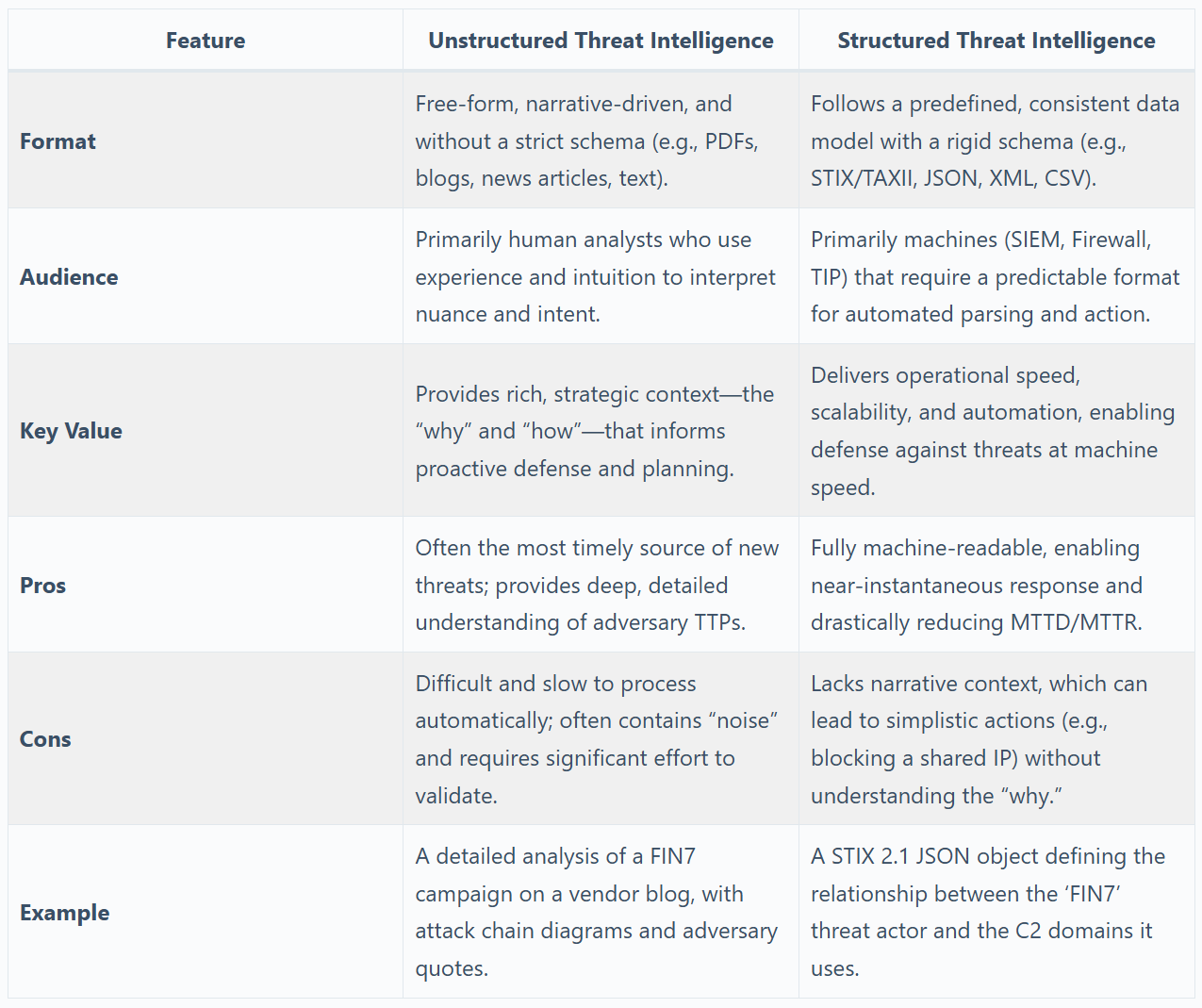
Different scenarios demand different strategies. Knowing when to use each improves efficiency and impact.
Structured Hunting Using MITRE ATT&CK
Map hunts directly to adversary tactics and techniques.
- Start with a TTP (e.g., T1055 – Process Injection)
- Search for associated behaviors across endpoints
- Expand to related techniques (e.g., T1078 – Valid Accounts)
Benefits:
– Ensures systematic coverage of the attack lifecycle
– Enables prediction of next steps (e.g., lateral movement after persistence)
– Supports detection engineering and gap analysis
Tool Integration: Most EDR platforms include MITRE ATT&CK heatmaps to visualize detection coverage.
Expert Note: Prioritize high-risk TTPs like credential dumping (T1003) and living-off-the-land binaries (LOLBins).
Unstructured Hunting from Anomalies
Begin with a suspicious event or IoC, then pivot through logs to trace the full scope.
- Triggers:
- Unexpected process execution
- Unknown external IP connection
- Low-confidence alert
Method:
1. Isolate the initial event (e.g., cmd.exe launched from a browser)
2. Correlate across logs to map origin and impact
3. Determine if part of a larger campaign
Example: Anomalous DNS query patterns lead to discovery of DNS tunneling used for data exfiltration.
Best Practice: Document all findings—even false positives—to refine future detections.
Situational (Entity-Driven) Hunting
Focus on high-value assets most likely targeted by attackers.
Target entities:
– Domain controllers
– Admin workstations
– Backup servers
– Cloud root accounts
Approach:
– Monitor all activity involving these systems
– Hunt for signs of compromise: unusual access, configuration changes, failed logins
Case Example: Suspicious Kerberos requests to a domain admin account led to discovery of Kerberoasting—a critical find that stopped lateral movement.
Why It Matters: Attackers always go after the crown jewels—so should you.
Essential Threat Hunting Techniques
Beyond methodology, technical execution is key. Master these core techniques to uncover stealthy threats.
Query-Based Data Hunting
The backbone of any hunt: writing precise queries to sift through massive datasets.
- Languages: KQL (Microsoft Sentinel), Splunk SPL, Elasticsearch DSL
- Key skills:
- Filtering noise
- Correlating events across sources
- Time-based analysis (e.g., 7-day trends)
Example KQL Query:
kql

DeviceProcessEvents

| where ProcessName == "powershell.exe"

| where CommandLine has "Invoke-Mimikatz" or CommandLine has "IEX"

| project Timestamp, DeviceName, AccountName, CommandLine
Avoid Pitfall: Overly broad queries generate noise. Always start narrow and expand.
Stack Counting for Anomaly Detection
Count event occurrences to spot statistical outliers.
Use cases:
– Failed logins per hour
– Outbound connections to rare ports
– File encryption events
Process:
1. Define normal threshold (e.g., <5 SMB connections/min)
2. Alert on spikes (e.g., 500+ connections—possible ransomware)
Tool Tip: Use SIEM dashboards to visualize stack counts over time.
Real-World Use: Detected ransomware propagation by spotting sudden surge in port 445 traffic.
Cluster Analysis for Pattern Discovery
Group similar events to reveal hidden attack patterns.
How it works:
– Apply ML clustering to log data
– Identify groups of related behavior
– Investigate clusters that deviate from norm
Example: Multiple users showing:
– Failed logins
– PowerShell execution
– SMB access
Clustering reveals coordinated brute-force campaign.
Tool Support: UEBA and advanced SIEMs offer built-in clustering features.
Memory and Disk Forensics
Go beyond logs—analyze RAM and disk for fileless malware and process injection.
Common targets:
– Suspicious processes
– Hollowed-out legitimate apps (e.g., explorer.exe)
– Code injection (e.g., reflective DLL loading)
Tools:
– Volatility: Open-source memory analyzer
– Rekall: Forensic memory analysis
– FTK Imager: Disk imaging and artifact extraction
Procedure:
1. Capture memory dump from suspect endpoint
2. Scan for injected code, hidden processes
3. Extract payloads or C2 IPs
Critical For: APTs using memory-resident malware to avoid disk writes.
Behavioral Baseline Profiling
Know what “normal” looks like to spot deviations.
Steps:
1. Profile users: login times, app usage, data access
2. Profile devices: network connections, process activity
3. Flag anomalies automatically via UEBA
Example: A developer suddenly accessing HR databases triggers investigation—turns out to be insider threat.
Maintenance Tip: Update baselines quarterly or after major changes (e.g., remote work rollout).
Retroactive (Historical) Hunting
Dig into archived logs to find threats missed in real time.
Why it matters:
– Dwell time averages 200+ days
– Attackers lie dormant before acting
Requirements:
– Long-term log retention (90–365 days)
– Scalable storage (cloud or on-prem data lake)
– Fast search capability
Scenario: After learning of a new ransomware variant, run retro hunt for early-stage TTPs (e.g., PsExec usage).
Pro Move: Schedule monthly retro hunts based on emerging threats.
Frameworks That Power Threat Hunting
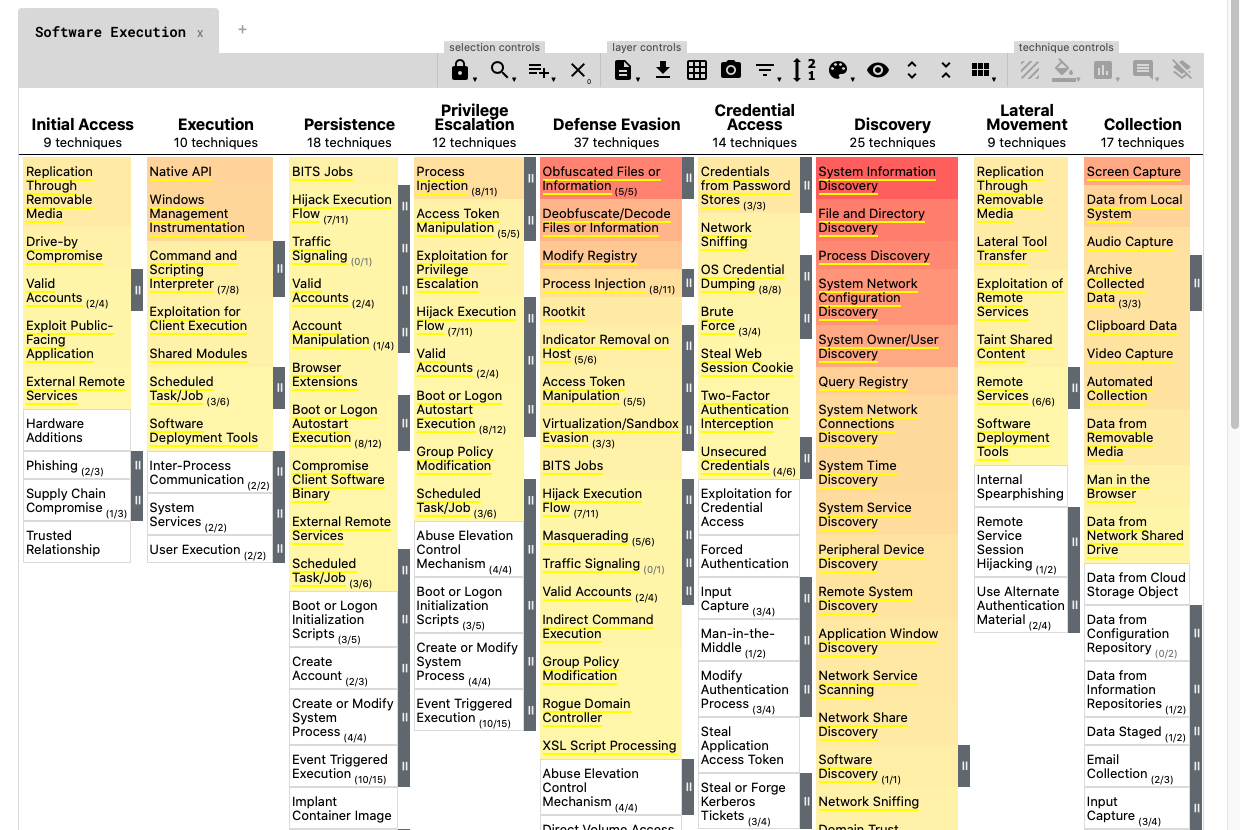
Standardized models provide structure and ensure comprehensive coverage.
MITRE ATT&CK for Hypothesis Generation
The gold standard for mapping adversary behavior.
Structure:
– Tactics (e.g., Execution, Persistence, Lateral Movement)
– Techniques (e.g., T1059 – Command and Scripting Interpreter)
– Sub-techniques (e.g., T1059.001 – PowerShell)
How to use:
1. Pick a tactic relevant to your risk (e.g., Privilege Escalation)
2. Review common techniques used in your industry
3. Hunt for evidence in your environment
Tool Integration: EDR and XDR platforms map alerts to ATT&CK for easy gap analysis.
Power Move: Build a “heat map” showing which techniques you can detect vs. those you can’t.
Cyber Kill Chain for Attack Staging
Lockheed Martin’s model breaks attacks into seven phases.
Phases:
1. Reconnaissance
2. Weaponization
3. Delivery
4. Exploitation
5. Installation
6. Command & Control
7. Actions on Objectives
Hunting application:
– Hunt early (e.g., delivery phase) to stop attacks sooner
– Analyze post-breach to improve prevention
Example: Detect phishing emails (Delivery) before exploitation occurs.
Limitation: Less granular than MITRE ATT&CK, but great for executive reporting.
Diamond Model for Linking Incidents
Focuses on four core elements:
– Adversary
– Victim
– Capability
– Infrastructure
Use to:
– Connect seemingly unrelated events
– Attribute attacks to same actor
– Visualize attack relationships
Example: Two separate phishing campaigns used same C2 IP and malware hash—linked via Diamond Model.
Ideal For: Threat intelligence analysts and incident responders.
Must-Have Threat Hunting Tools

No hunter succeeds without the right tools. These are essential.
EDR/XDR Platforms
Your primary sensor grid for endpoint visibility.
Capabilities:
– Real-time process monitoring
– Timeline reconstruction
– Remote shell and quarantine
– Script execution logging
Top Platforms:
– CrowdStrike Falcon
– Microsoft Defender for Endpoint
– SentinelOne
– Elastic Security
Why EDR Wins: Full visibility into process trees, file changes, and registry edits—critical for detecting LOLBins and script-based attacks.
SIEM with Advanced Search
Central hub for log aggregation and correlation.
Functions:
– Normalize logs from firewalls, AD, cloud, etc.
– Run complex queries (SPL, KQL)
– Generate custom alerts
Popular SIEMs:
– Splunk Enterprise Security
– IBM QRadar
– Microsoft Sentinel
– LogRhythm
Pro Tip: Use data modeling to streamline hunting (e.g., create “User Activity” schema).
UEBA for Anomaly Detection
Detect compromised accounts and insider threats.
How it works:
– Learns normal behavior
– Flags deviations (e.g., admin accessing from new country)
– Scores risk level
Use Cases:
– Privilege escalation
– Data exfiltration
– Account takeover
Key Advantage: Finds threats that pass authentication but act abnormally.
Threat Intelligence Platforms (TIPs)
Operationalize IOCs and TTPs.
Features:
– Ingest and normalize threat feeds
– Enrich indicators (geolocation, reputation)
– Push to SIEM/EDR for automated hunting
Examples:
– Anomali ThreatStream
– ThreatConnect
– Recorded Future
Best Practice: Automate IOC ingestion to enable real-time retro hunts.
Final Note
Threat hunting is no longer a luxury—it’s a strategic necessity. With attackers hiding in plain sight, organizations must assume compromise and hunt aggressively. By applying these proven threat hunting techniques, leveraging frameworks like MITRE ATT&CK, and using the right tools and data, you can detect threats others miss and dramatically reduce risk.
Start small: pick one hypothesis, run one hunt, document the result. Then scale. Build skills, refine processes, and automate where possible. In a world where “not all intrusions trigger alarms,” threat hunting is your decisive advantage.


0 Comments