If you’ve ever stood on a ridge unsure whether the next step would put you on private property, or spent hours glassing only to realize you’re miles from legal hunting ground, the onX Hunt app is your game-changer. Used by over 2 million hunters across North America, it turns your smartphone into a real-time navigation and scouting powerhouse—whether you’re tracking elk in the Rockies or chasing whitetails in the Midwest. With 985 million acres of mapped public land and advanced tools like Deer Movement Forecast and LAR terrain modeling, onX doesn’t just show you where you are—it tells you where to go, when to be there, and how to stay legal. This guide walks you through every essential step, from setup to advanced scouting, so you can hunt smarter, avoid trespassing, and increase your odds of success.
Create Your Account and Install the App
Before you can navigate public land or drop waypoints, you need access to onX Hunt’s full suite of tools. The process is simple and sets the foundation for seamless hunting intelligence.
Download and Set Up
- Download the app from the App Store (iOS) or Google Play (Android) — simply search “onX Hunt.”
- Visit onxmaps.com to create an account using your email or social login (Google, Apple, etc.).
- Choose a subscription plan: Free, Premium, or Elite—each offering different levels of access.
- Log in on all devices—your mobile, desktop, and compatible GPS units sync automatically when using the same account.
Pro Tip: Save 30% on your first year of Premium or Elite by using promo code APP101 at checkout on the website. This discount isn’t available through app stores.
Select the Right Plan for Your Hunt
| Plan | Coverage | Price | Best For |
|---|---|---|---|
| Free | 1 state (limited features) | $0 | Casual scouting or first-time users |
| Premium | 1 or 2 U.S. states | $34.99–$49.99/year | Local hunters focused on specific regions |
| Elite | All 50 states + Canada | $99.99/year or $14.99/month | Travelers, drawn-tag hunters, and serious backcountry adventurers |
Elite unlocks Deer Movement Forecast, LAR (Landscape Analysis & Relief) terrain maps, and Hunt Research tools—features that pay for themselves when you land a trophy buck in a competitive draw unit.
Navigate Basemaps and Activate Critical Layers
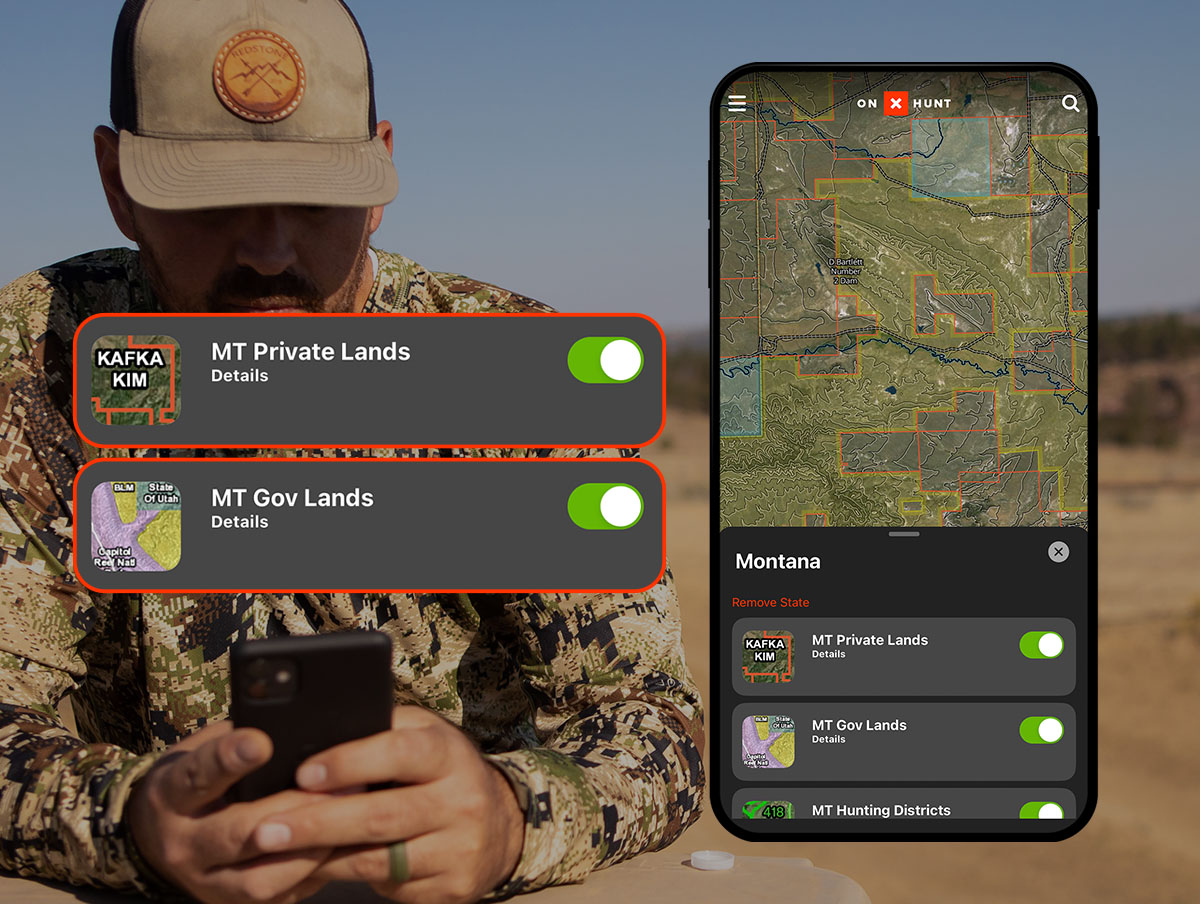
Your map view is the foundation of every successful hunt. Choosing the right basemap and map layers reveals terrain, ownership, and access details at a glance—so you never second-guess your location.
Choose the Best Basemap for Your Hunt
- Satellite: See real-world vegetation, rock outcrops, and canopy cover—great for identifying bedding zones.
- Topography: View contour lines for elevation and slope—ideal for understanding drainage patterns.
- Hybrid: Satellite image overlaid with topo lines—perfect for e-scouting with visual and elevation context.
- LAR (Elite only): Ultra-high-resolution terrain model revealing subtle ridgelines, benches, and cliffs invisible on standard maps.
Pro Tip: Use LAR in 3D mode on desktop to spot elk beds on north-facing slopes or hidden saddles that flat maps miss.
Turn On Key Map Layers to Avoid Trespassing
Tap the Layers icon to activate overlays that transform your map into a hunting intelligence dashboard:
- Public Land (Yellow): Land open to hunting without permission—includes BLM, National Forests, and state lands.
- Private Land (Red): Requires landowner consent—tap any red parcel to see the owner’s name, acreage, and tax address.
- Game Management Units (GMUs): Official hunting zones—click to view season dates, bag limits, and coordinates.
- Roads & Trails: Purple lines show motorized access; color-coded by difficulty and elevation.
- Slope Angle: Steepness coded by color:
- Green: 0–15° (walkable)
- Red/Purple: >45° (risky or impassable terrain)
Critical Reminder: “Possible access” doesn’t mean legal entry. Always verify with your state Game & Fish Department before entering.
Download Offline Maps for Backcountry Confidence
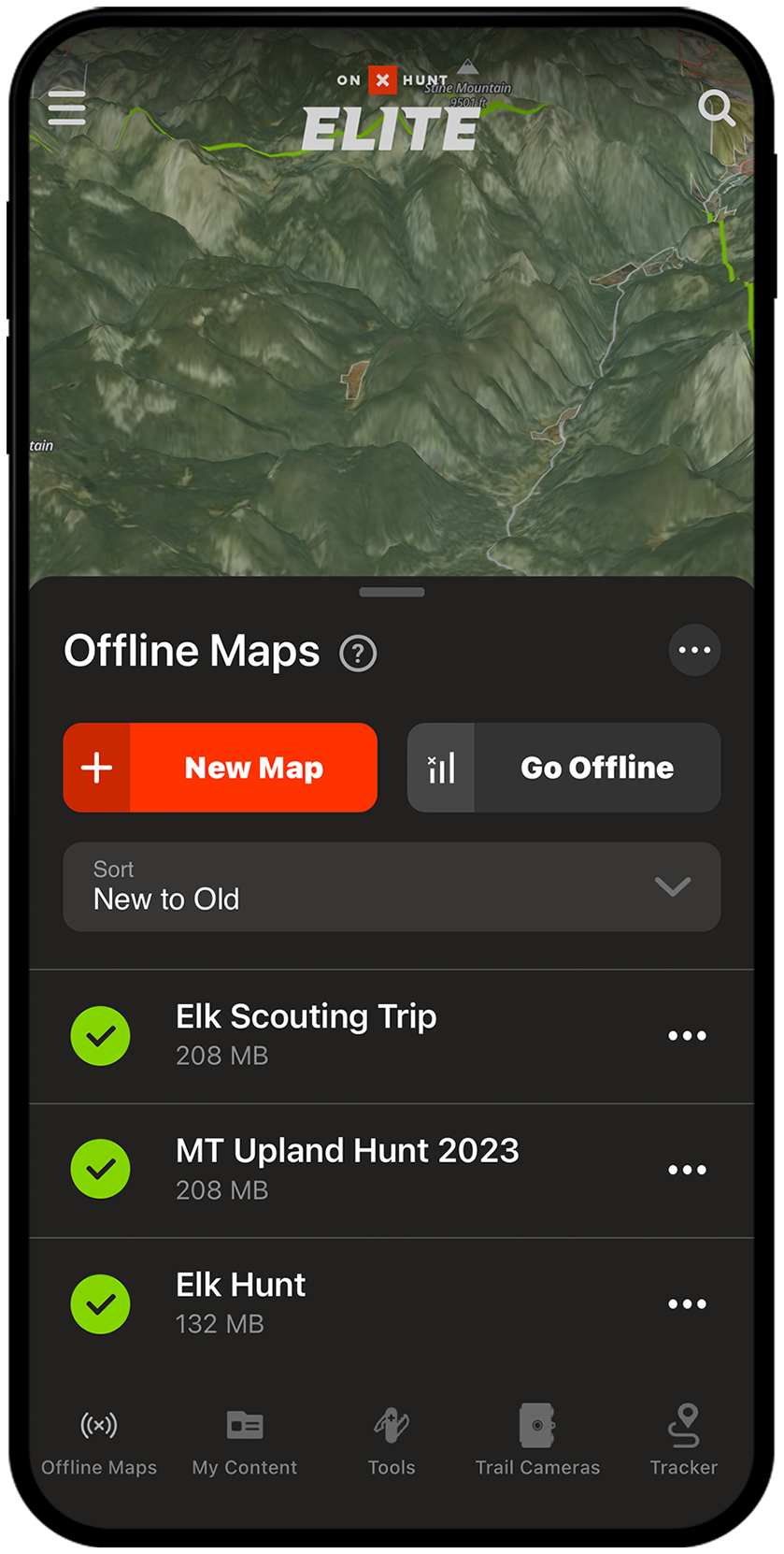
Cell service disappears the moment you step off the beaten path—but your navigation shouldn’t. Offline maps keep your GPS running with full access to layers and tools, even in airplane mode.
How to Save Maps for Offline Use
On Mobile:
1. Tap Offline Maps > New Offline Map
2. Drag to select your hunting unit or trail system
3. Choose resolution:
– Low: Whole state, small file
– Medium: Balanced detail and size
– High: Max detail, small area (e.g., single GMU)
On Desktop:
– Build your map in the Web Map
– Sync to mobile when connected
Pro Tip: Download two versions—a low-res state map for general navigation and a high-res version of your key GMU for detailed scouting.
Once downloaded, your blue dot remains accurate to within 10 feet, even with no signal. No internet? No problem.
Use Waypoints to Mark Critical Hunting Spots
Waypoints are digital pins that mark anything important—from trailheads and water sources to rubs, scrapes, and past kill sites.
Add and Customize Waypoints
- Tap the Waypoint tool (pin icon)
- Place on map or long-press a location
- Edit:
– Name (e.g., “Water Source #3” or “2024 Buck Kill”)
– Icon (choose elk, deer, gate, shed, or truck)
– Color (use blue for water, red for success, yellow for interest)
– Notes, photos, or coordinates
Organize for Team Hunting Success
- Create folders by species, year, or unit (e.g., “2025 Mule Deer – Unit 67”)
- Share folders with hunting partners for real-time collaboration
- Bulk edit multiple waypoints—change color or folder in one tap
Example: Share a “Scouting Trip – July 2025” folder with your partner so you both update rub locations and trail camera sightings in real time.
Plan Routes and Measure Distance Like a Pro
Whether hiking in or driving to a trailhead, smart route planning saves time, energy, and battery life.
Build a Custom Route
- Tap Route Builder
- Set start and end points
- App snaps to roads, trails, and game paths
- View elevation profile and total distance
Use different route types:
– Hike: Avoids steep grades
– Drive: Uses motorized roads
– Bike: Balances speed and terrain
Measure Land Features with Precision
- Draw Line: Tap two points to measure distance (e.g., food plot length or access trail)
- Area Measure: Draw a shape to calculate acres—perfect for lease evaluation or food plot planning
Field Use: Verify if a “public” parcel is truly accessible by measuring the distance to the nearest legal entry point.
Use Compass Mode to Track Game Movement
When you hear a bugle, catch a glimpse of a buck, or find fresh tracks, Compass Mode helps you lock in direction and distance.
Activate and Use Compass Mode
- Tap your blue location dot twice
- Hold phone flat and point toward the sound or sign
- Use the built-in rangefinder to estimate distance (e.g., 200 yards)
- Drop a waypoint at exact bearing
Best for: Elk and deer hunters during rut—place ambush points downwind of known bedding areas.
This feature turns your phone into a directional tracker, helping you retrace animal movement even in dense timber.
Search and Navigate to Locations Instantly
Skip endless scrolling—jump directly to your destination using the Search bar.
Search Options Include:
- Addresses or trailheads
- GPS coordinates (DD, DMS, UTM)
- Landowner names
- Peaks, lakes, or landmarks
Time-Saver: Enter UTM coordinates from a trail camera photo to drop a pin instantly.
Use this before every hunt to verify your starting point and legal boundaries.
Check Wind and Weather to Predict Animal Activity
Deer and elk move based on weather. Use onX’s tools to predict activity and plan accordingly.
Wind Calendar (Elite Feature)
Shows projected wind at:
– Sunrise
– Midday
– Sunset
Use to:
– Position stands downwind of bedding zones
– Time rut hunts when bucks cruise edges
– Avoid noisy entry routes on windy days
Real-Time Weather
Check current:
– Wind speed and direction
– Temperature
– Precipitation
Pro Tip: Bucks increase movement during rising barometric pressure—combine wind data with Deer Movement Forecast for peak timing.
Scout in 3D and Use Terrain X for Elite-Level Planning
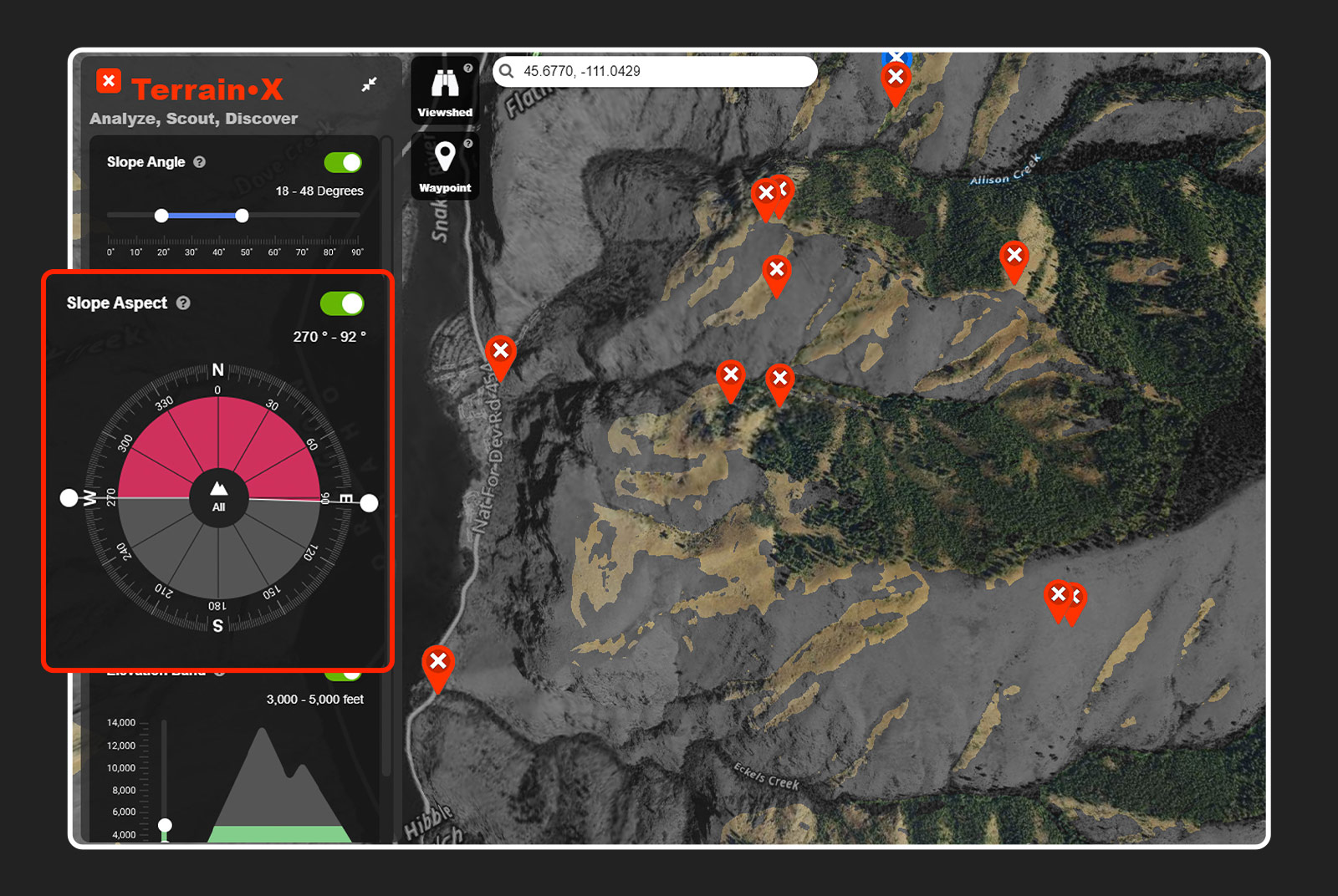
See terrain like a predator—both from above and from the ground.
3D Map Mode
- Rotate and tilt view to study ridgelines and drainages
- Combine with LAR and slope layers for ultra-detailed analysis
- Available on desktop only (mobile version in development)
Terrain X (Desktop)
Filter terrain by:
– Slope: 20–35° is prime elk bedding
– Aspect: South-facing slopes green up first in spring
– Elevation: Target 10,800–11,700 ft for late-season elk
Use viewshed analysis to:
– Find glassing spots with maximum visibility
– Avoid being seen on skyline ridges
– Plan ambush points along travel corridors
Elite Advantage: These tools help you find spots other hunters miss.
Access Advanced Elite Tools for Smarter Hunting
Upgrade to Elite for predictive analytics and deep research capabilities.
Deer Movement Forecast
Predicts peak activity using:
– Moon phase
– Temperature
– Wind
– Barometric pressure
Get daily activity ratings—hunt when conditions are optimal.
Hunt Research Tools
- Draw Odds Calculator: Estimate tag draw chances based on your points and unit
- Harvest Data: See success rates and average trophy sizes
- Applicant Numbers: Know how competitive your unit is
Use Case: Decide whether to apply for a 5-point mule deer tag in Colorado with 85% confidence.
Trail Camera Integration
- Link cameras to onX
- View photos and GPS-tagged locations on map
- Sync timestamps to track movement patterns
Prepare and Hunt Legally: Avoid Trespassing
onX helps you avoid trespassing—but you must use it wisely.
Verify Public Land Access
- Not all public land allows hunting
- Some require special permits or restrict weapon types
- State Trust Lands may be leased to ranchers—access not guaranteed
Example: In Arizona, checkerboard state trust land often requires landowner permission—even if it’s “public.”
Avoid Landlocked Public Land
Many parcels are surrounded by private property with no legal access. Use Route Builder to confirm you can reach your target area.
Rule of Thumb: If the only way in crosses red (private) land, assume you can’t enter.
Sync, Update, and Share Data Across Devices
Keep your data fresh and share plans with your team.
Sync Across Devices
- Log in with the same account on mobile and desktop
- Waypoints, routes, and maps update automatically
- Plan on desktop, execute on mobile
Stay Updated
- Update the app regularly
- New features roll out monthly (e.g., Leaf-Off Imagery, Recent Fire Maps)
- Attend onX Master Classes for live training
Pro Tip: Enable notifications for deadline alerts on draw applications.
Final Tips for Success in the Field
- Double-check boundaries near fences or signs—onX is accurate to 5–10 feet but not infallible
- Use airplane mode in the field to extend battery life
- Record your path with the Tracker tool—invaluable for blood trailing or returning to camp
- Respect landowners—even if land is public, access may be restricted
- Hunt ethically—use onX to make smarter decisions, not shortcuts
“With onX, I know exactly where I’m legal—and where the deer are moving. It’s changed how I hunt.” — Anonymous Elk Hunter, Montana
Now that you know how to use onX Hunt app, download it, plan your next adventure, and step into the field with total confidence.


0 Comments